


QUICKSURFACE Scan to CAD Software
Please select from the following:
- QUICKSURFACE Pro - Permanent license (one year maintenance included)
- QUICKSURFACE Lite - 1 Year license (subscription)
Shipping
Software shipped electronically. Once the software has been installed with the product key this product can no longer be returned.
Already a SOLIDWORKS User?
This listing is for QUICKSURFACE stand-alone software package. If you are already using SOLIDWORKS CAD modeling software, check out QUICKSURFACE for SOLIDWORKS, a reverse engineering plugin.
Already a Rhino User?
If you are already using Rhino CAD modeling software, check out Mesh2Surface, a reverse engineering plugin.
QUICKSURFACE makes reverse engineering more accessible. It has comprehensive SCAN to CAD tools that are simple to use yet powerful for even complex parts.
A Bridge Between 3D Scanning and Manufacturing

QUICKSURFACE is a powerful stand-alone 3D reverse engineering software that helps you in converting raw 3D scan data (3D meshes) into accurate, manufacturable CAD models—fast!
With powerful reverse engineering tools and an intuitive workflow, recreate 3D geometry without unnecessary complexity. Quickly orient, draw, create, and trim surfaces into a usable CAD model.
Import STL, OBJ, PLY meshes and point clouds from virtually any scanning system. Just bring your scan data into the software and start modeling.
QUICKSURFACE can:
- Handle Parametric + Freeform modeling: Combine structured CAD features with flexible surface tools in one workflow— ideal for both precise engineering parts and organic geometries.
- Export STEP / IGES for manufacturing: Deliver clean, production-ready CAD models that integrate directly into CAD, CAM, and engineering systems for downstream design and fabrication.
- Handles complex industrial parts: Rebuild mechanical components, tooling, and detailed assemblies with high geometric accuracy, even from dense or imperfect scan meshes.
What's New in QUICKSURFACE 2026?
The 2026 version is now powered by Siemens Parasolid for reliability and speed.
Features Include
- Accurate scan alignment by features, scan-to-scan, or scan-to-CAD
- Large meshes editing and optimisation
- Fast geometric primitive extraction
- 2D & 3D sketching on scan data
- Parametric design with full dimension control
- Advanced tools — Loft, Sweep, Shell, Thicken, Draft, Move Face, Patterns
- Automatic and freeform surfacing
- Hybrid modelling of solids and freeform surfaces
- Real-time deviation control and accuracy check
- Flattening and unrolling tools
- Powered by Siemens Parasolid for reliability and speed
Which Version is Right for Me?
QUICKSURFACE is available in two editions: Pro and Lite. The Pro edition is offered as a permanent license and includes one year of maintenance. The Lite edition is available only as an annual subscription and is no longer sold as a permanent license. For a detailed comparison, see the video provided.
Technology Accessible For Your Entire Team
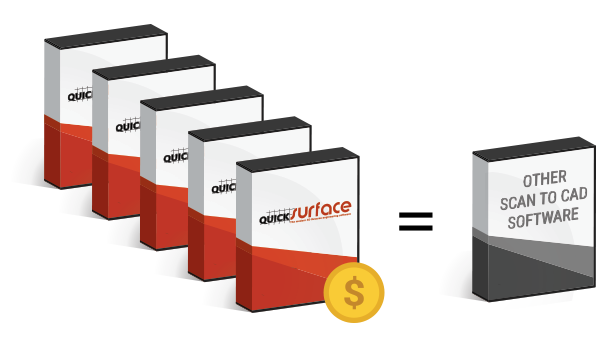
You can purchase multiple copies of QUICKSURFACE for your company at the same price as one copy of a mainstream 3D reverse engineering software. Empower your team to work together using the same software for better communication and work efficiency.
Learn more about QUICKSURFACE by reading the interview with the software's inventor, KOSTADIN VRANTSALIEV.
Read NowWhat Makes QUICKSURFACE different?
Reverse engineering can be complex and a time-consuming process to get the right results. All the while, mainstream standalone 3D reverse engineering software has been expensive and complicated to use. QUICKSURFACE looks to change all of that.
- Interactive selection by the user instead of automatic segmentation on reference mesh
- Apply constraints (e.g. axis-aligned cylinders) during best-fit operations
- Quick alignment based on extracted primitive (datum) prioritization
- Mirrored point display to check symmetry of the aligned scan object
- Real-time deviation colour map in 2D Sketch mode
- Parametric hybrid modelling - starting with free form and basic primitives, the user can build a complex CAD model by trimming them and can later change the surfaces based on the design intent
- Modify surface design intent with intuitive manipulators
- An affordable price for faster return on investment
Review by Develop3D
Excerpt from QUICKSURFACE review
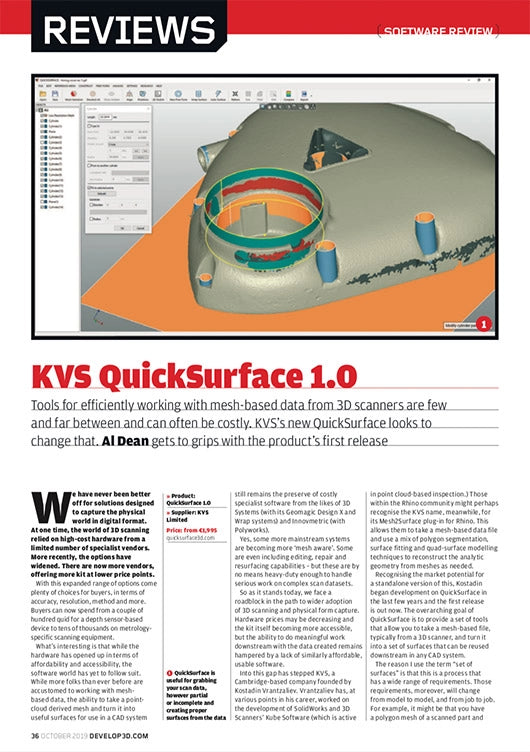
“QUICKSURFACE is about taking your mesh-based data out of your scanning process and achieving the geometry you want. Whether that’s a complete part, skinned and surfaced up, or a select set of reference surfaces from which you will begin to design another part, QUICKSURFACE handles these tasks in a very efficient, clearly defined and well-executed manner.”
Read Full ReviewFAQ
Common questions you might have about QUICKSURFACE Scan to CAD software.
What are the system requirements for QUICKSURFACE?
The minimum system requirements are:
- Laptop or PC with Windows 10 (64 Bit version)
- CPU: Intel i5 or higher (or its equivalent of another CPU manufacturer)
- RAM: 16GB
- HDD: 256 GB
- Graphics card: dedicated graphics card – nVidia or AMD
- Internet: Software and licenses are delivered and activated using Internet connection.
- Once activated we recommend an internet connection to allow automatic newer version detection to keep you up to date (not mandatory, it would be your decision).
Can QUICKSURFACE handle large scan data sets?
QUICKSURFACE is a 64-bit application and can easily handle ~100 million triangles.
For easier manipulation, its built-in polygon reduction tools (to decimate the scan data) allow users to optimize mesh density while maintaining high-quality results.
What type of training are available once I purchase QUICKSURFACE?
QUICKSURFACE developers created many resources to get you started on using the software. Start with the step-by-step video tutorials and the QuickStart lessons. Most users become effective in a few hours and fully comfortable within a week.
At GoMeasure3D, we can also book a one-on-one training session if you would like a personalized course for your use case. You can Contact Us to learn more.

